HomeAboutAll Posts

SharePoint Site Settings and Site Contents Browser Shortcuts

By Denis Molodtsov
Published in SharePoint
July 14, 2026
1 min read
SharePoint Site Settings and Site Contents Browser Shortcuts

Table Of Contents

01
The Problem
02
The Workaround
03
How to Add a Bookmark
04
Open Site Settings
05
Open Site Contents

The Problem

Lately, on many SharePoint Online tenants, I noticed that the cog wheel (settings) menu takes ages to load.
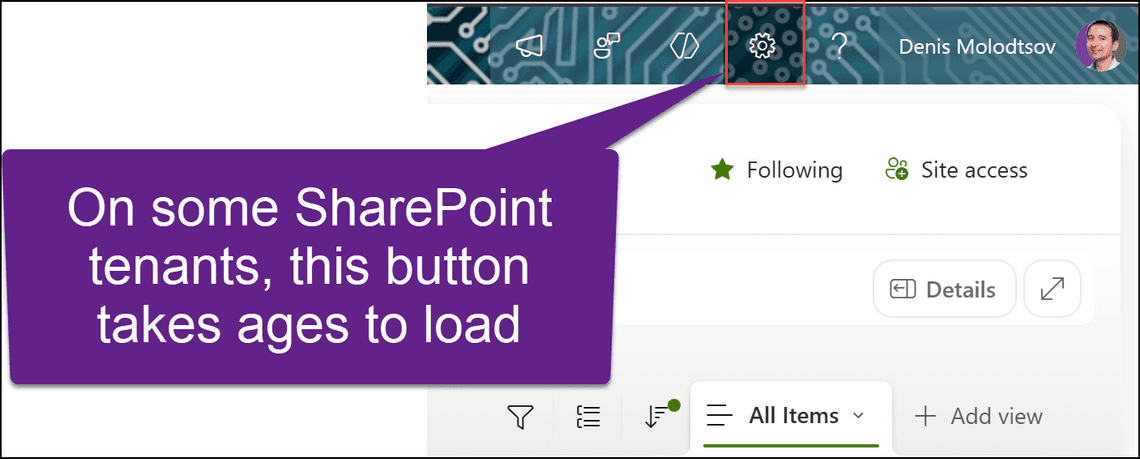
On some SharePoint tenants, the cog wheel button takes ages to load

The Workaround

These two scripts jump straight to Site Settings or Site Contents of the site or subsite you are on. Save each one as a bookmark and click it from any SharePoint page.

How to Add a Bookmark

  • Right-click the bookmarks bar and choose Add page (Chrome) or Add this page to favorites bar (Edge).
  • Name it, e.g. Open Site Settings.
  • Inside the URL field, paste the code below.
  • Chrome and Edge might strip the javascript: prefix on paste. If so, type javascript: back in front of the pasted text.
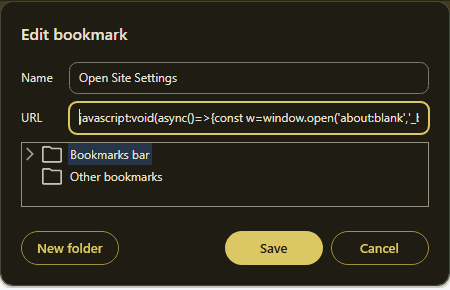
Edit bookmark dialog with the script pasted into the URL field

This is how the bookmarks appear in the browser:
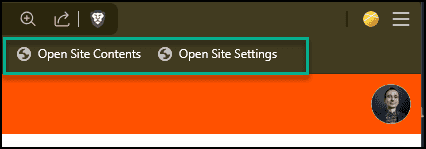
Open Site Contents and Open Site Settings bookmarks on the browser bookmarks bar

Open Site Settings

javascript
javascript:void(async()=>{const w=window.open('about:blank','_blank');try{let u=(typeof _spPageContextInfo!=='undefined'&&_spPageContextInfo.webAbsoluteUrl)?_spPageContextInfo.webAbsoluteUrl:null;if(!u){u=location.href.split('?')[0].split('#')[0];for(const s of['/_layouts/','/_api/','/sitepages/','/lists/','/forms/','/pages/','/siteassets/','/_app/']){const i=u.toLowerCase().indexOf(s);if(i>-1){u=u.substring(0,i);break}}u=u.replace(/\/[^\/]*\.aspx$/i,'')}const r=await fetch(u+'/_api/contextinfo',{method:'POST',headers:{Accept:'application/json;odata=verbose'},credentials:'same-origin'});if(!r.ok)throw new Error('HTTP '+r.status);const t=(await r.json()).d.GetContextWebInformation.WebFullUrl+'/_layouts/15/settings.aspx';if(w){w.location=t}else{location.href=t}}catch(e){if(w)w.close();alert('Could not resolve the SharePoint site from this page. '+e.message)}})();

Open Site Contents

javascript
javascript:void(async()=>{const w=window.open('about:blank','_blank');try{let u=(typeof _spPageContextInfo!=='undefined'&&_spPageContextInfo.webAbsoluteUrl)?_spPageContextInfo.webAbsoluteUrl:null;if(!u){u=location.href.split('?')[0].split('#')[0];for(const s of['/_layouts/','/_api/','/sitepages/','/lists/','/forms/','/pages/','/siteassets/','/_app/']){const i=u.toLowerCase().indexOf(s);if(i>-1){u=u.substring(0,i);break}}u=u.replace(/\/[^\/]*\.aspx$/i,'')}const r=await fetch(u+'/_api/contextinfo',{method:'POST',headers:{Accept:'application/json;odata=verbose'},credentials:'same-origin'});if(!r.ok)throw new Error('HTTP '+r.status);const t=(await r.json()).d.GetContextWebInformation.WebFullUrl+'/_layouts/15/viewlsts.aspx';if(w){w.location=t}else{location.href=t}}catch(e){if(w)w.close();alert('Could not resolve the SharePoint site from this page. '+e.message)}})();

Tags

SharePointJavaScriptBookmarklet

Share

Previous Article
Archive Unlicensed OneDrive Accounts Using M365 Archive Feature
Denis Molodtsov

Denis Molodtsov

Microsoft 365 Architect

Related Posts

SharePoint Migrations with CleverPoint Migrator
July 14, 2026
2 min

Quick Links

AboutAll Posts

Social Media