


Connect-SPOService: No valid OAuth 2.0 authentication session exists
October 18, 2026
1 min
In June 2026, Gregory Zelfond posted a question on LinkedIn that hit a nerve:
I still don’t understand why we can’t move files between SharePoint sites without buying a third-party migration tool. The free tool included with M365 will happily move data from file shares, Dropbox, and Google Drive. But once that content lands in SharePoint, game over!
My take in that thread:
I think we need a free, user-friendly desktop app that lets you copy across sites and tenants while preserving versions and metadata. It must not use PnP PowerShell or the Graph API, or require an Azure app registration to run.
Since I was not aware of any tool like that, I decided to build one.
CleverPoint Migrator is a free, open-source desktop app that copies SharePoint Online lists, libraries, folders, and files between sites. It preserves metadata, permissions, and version history. It works within a tenant and across tenants, and it handles OneDrive sites too, in any combination.
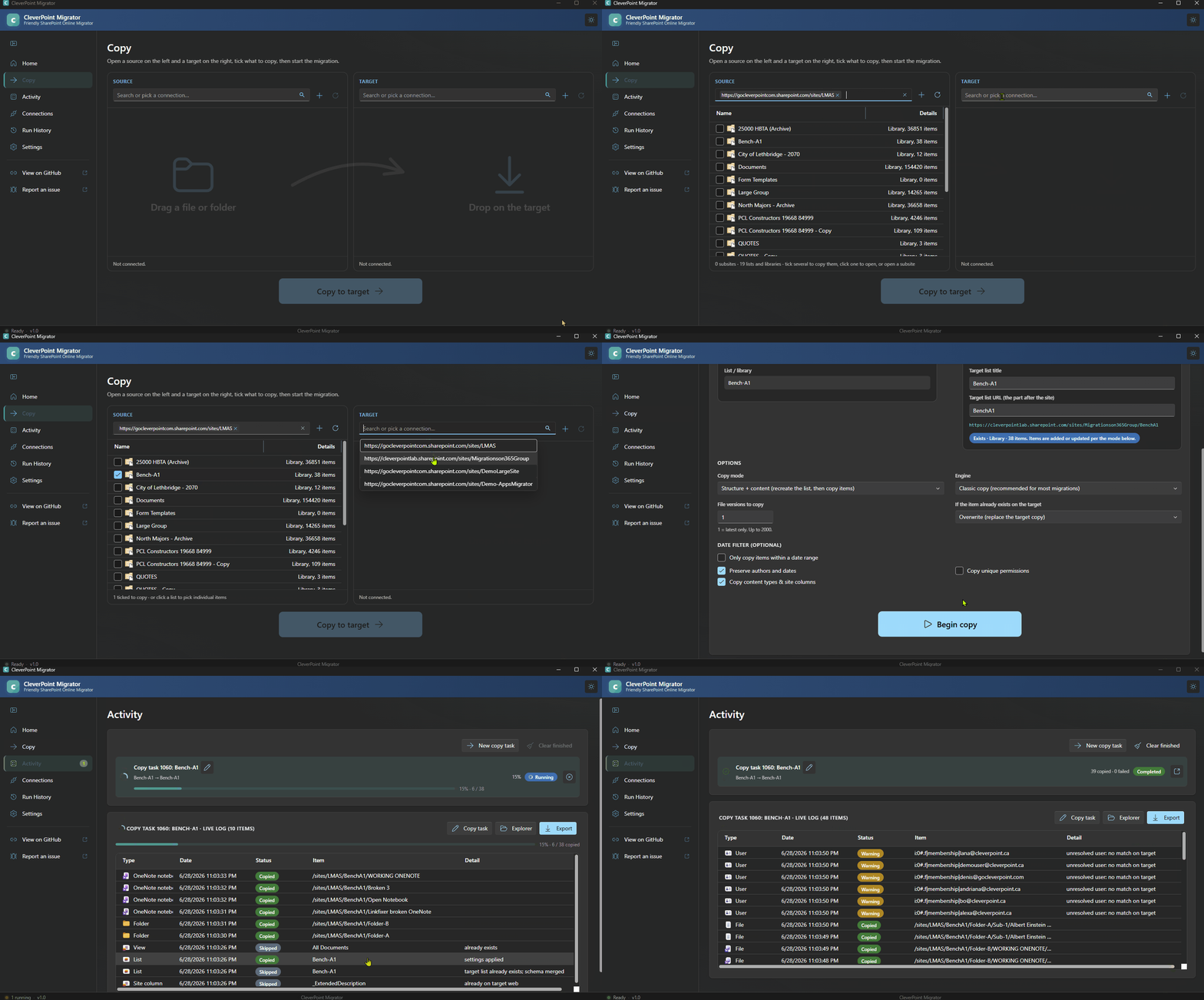
No Azure app registration, no PowerShell, no admin approval process. If you can open both sites in a browser, you can migrate between them.
Download the latest release from the GitHub releases page. You can use the MSI installer or the portable ZIP. For the portable version, extract it and run CleverPoint.Migrator.Ux.exe:
Sign in to the source and destination sites, pick what you want to copy, and go.
Is it secure? Where does my data go?
Everything runs locally on your computer. Nothing is sent to any third-party companies.
Does it work across tenants?
Yes. Tenant-to-tenant migrations work, including managed metadata as of release 1.0.12.
How many files can it handle?
There is no built-in restriction. 100K+ files should work just fine.
What about throttling?
Throttling won’t interrupt the copy. When Microsoft throttles a request, it sends back the recommended wait time, and the tool waits and retries.
What if the migration gets interrupted?
Re-run it. The tool also compares file sizes to detect corruption and automatically re-migrates any file that fails the check. You can download a full migration report listing every file, so everything is accounted for.
Does it migrate permissions?
It migrates file and folder permissions, but not site owners or members.
Does it support site pages?
Yes, it does.
Does it use PnP under the hood?
No, but it uses the same API as PnP.
How much does it cost?
It’s free. If someone needs additional support, I am happy to provide that.
This tool is for moving lists, libraries, folders, and files between SharePoint Online and OneDrive sites. It does not migrate entire sites, and it does not support SharePoint Server, file shares, Google, Exchange, or Teams. For file share migrations, use the free Microsoft SharePoint Migration Tool (SPMT). For full-scale tenant migrations with M365 groups, Teams, and mailboxes, I still use ShareGate and Quest ODM.
CleverPoint Migrator is not trying to replace ShareGate, Quest ODM, Metalogix, BitTitan, AvePoint, or SPMT. It fills the gap in between: the simple, common case of moving content around SharePoint without buying anything.
Grab it here: github.com/Zerg00s/CleverPoint-Migrator


