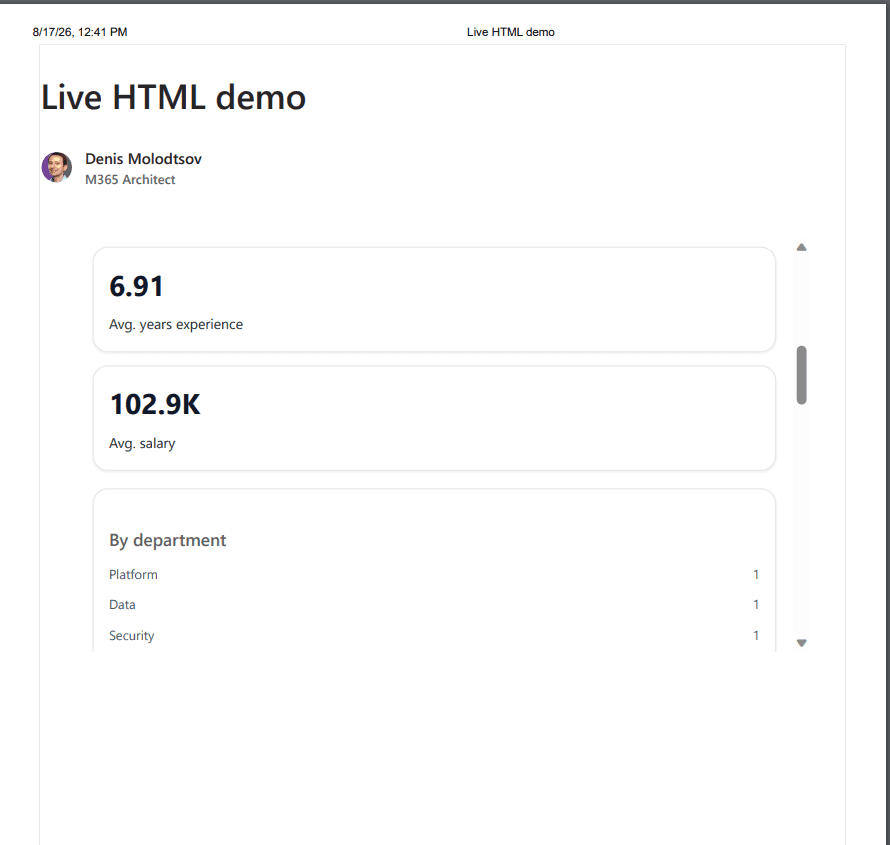
Microsoft is rolling out the ability to render HTML files as pages in SharePoint Online. The roadmap item is 569208, created on 11 August 2026, targeting General Availability in October 2026:
Create HTML with Copilot in SharePoint or upload your own HTML from another source. Once stored in the pages library, you can render HTML as a page in SharePoint, make additional edits, and share with your audience. HTML gives you new ways to present your content beautifully alongside our existing ASPX pages.
In this article I am going to show you how this feature works on the low level. The request and chain, the iframe sandbox it runs in.
I noticed that people tend to call these HTML pages dashboards. I will call them HTML files throughout, because that is what they are and the distinction matters.
I tested everything below against a live tenant on Targeted release in August 2026, before General Availability. Behavior may change by October 2026.
Strip away the excitement and this is a file viewer for a new file extension: .html. That is all it is. A lot of people are reading it as a developer feature, and it is not one. SharePoint can now simply display HTML files in a library, the same way it already displays PDFs. Well, almost the same way.
What makes it more interesting is that 1) the HTML files can run JavaScript, inside a very restricted sandbox and 2) SharePoint pre-fetches list data and hands it to the HTML file before it renders, which is what gives these HTML files an ability to show pseudo-live dashboards.
HTML files can be completely static, or semi-dynamic and work with data from a few data sources, but they are read-only either way.
To change an existing HTML file, open Copilot from the context of the HTML file itself and describe what you want. It will happily rewrite the file for you.
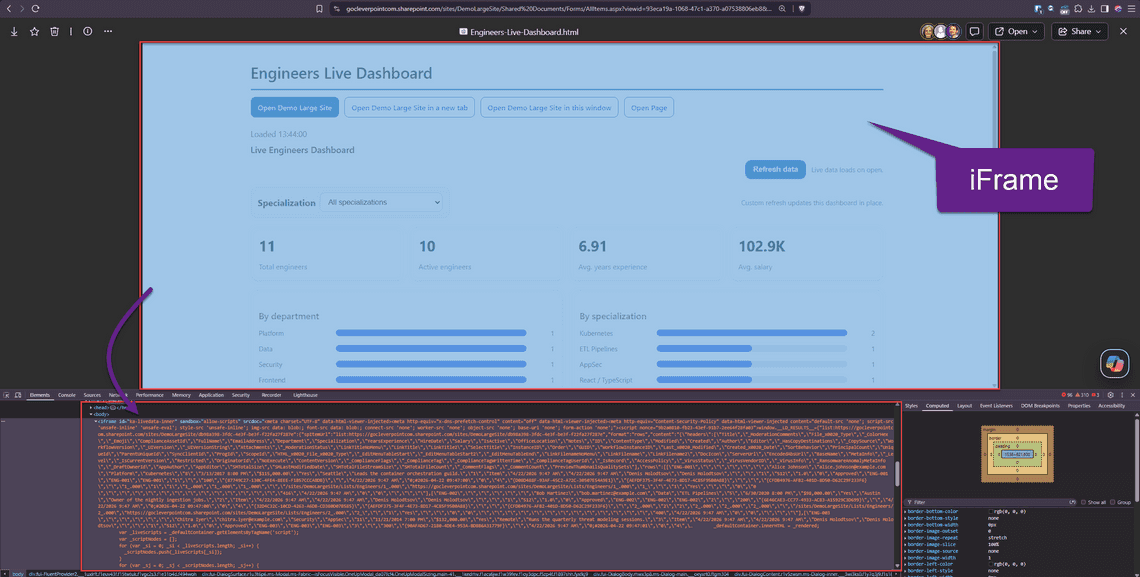
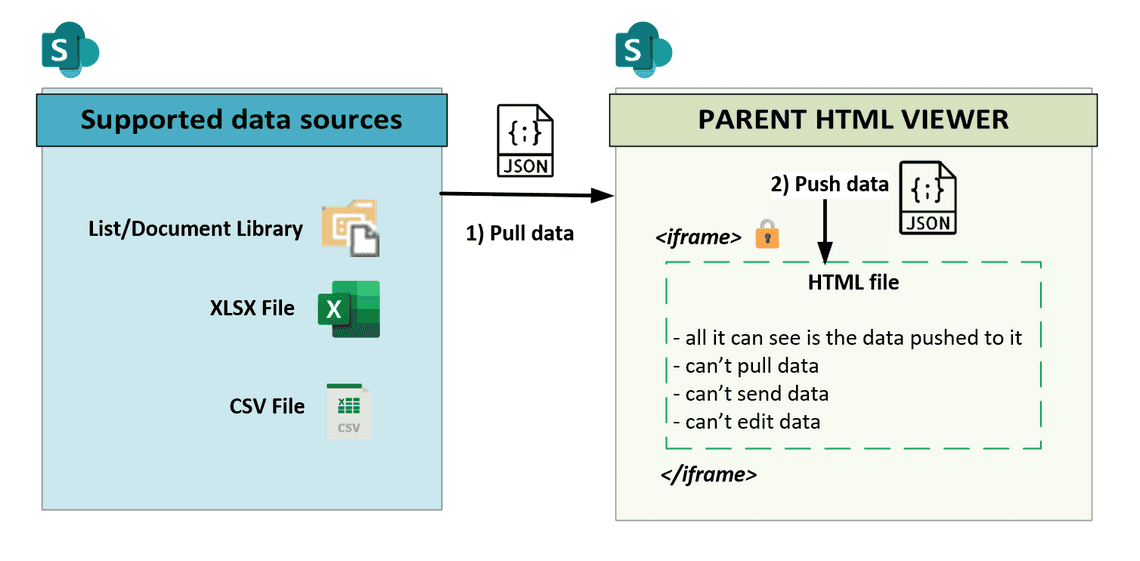
When one of these HTML files is opened, SharePoint puts it inside a sandboxed iframe, then pushes the data into it before any of the HTML file’s JavaScript runs.
JavaScript inside the HTML file is supported, but it has no way to break outside that file. It cannot make any HTTP requests, fetch data, or reach anything beyond its own markup. All it can do is manipulate that markup within the iframe. It cannot change the HTML file itself, which stays exactly as it was saved, so every refresh loads it again from scratch.
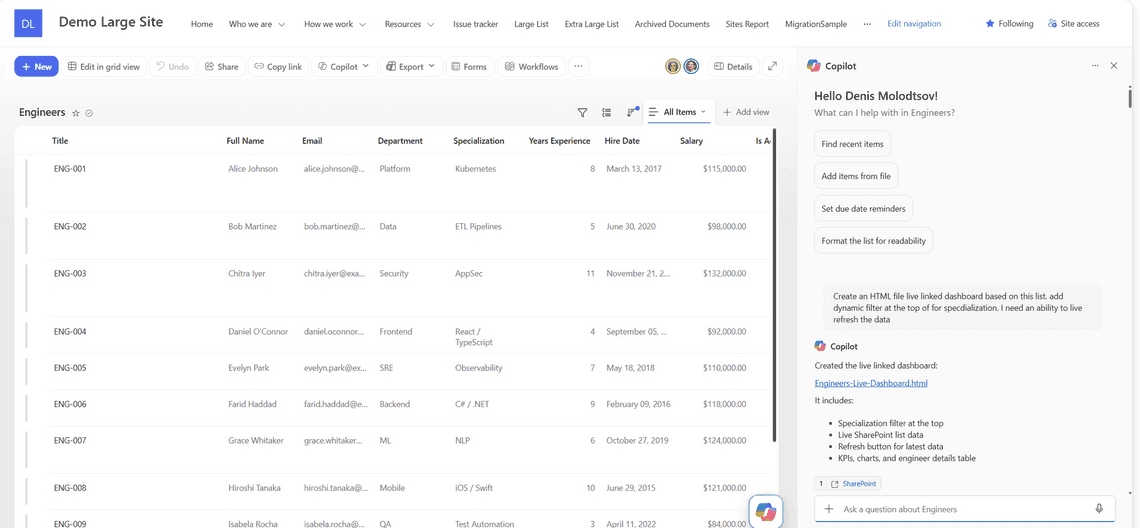
I let Copilot build this sample HTML file by giving it a prompt, starting from the Engineers list with the Copilot pane open:
The Copilot pane open beside the Engineers list
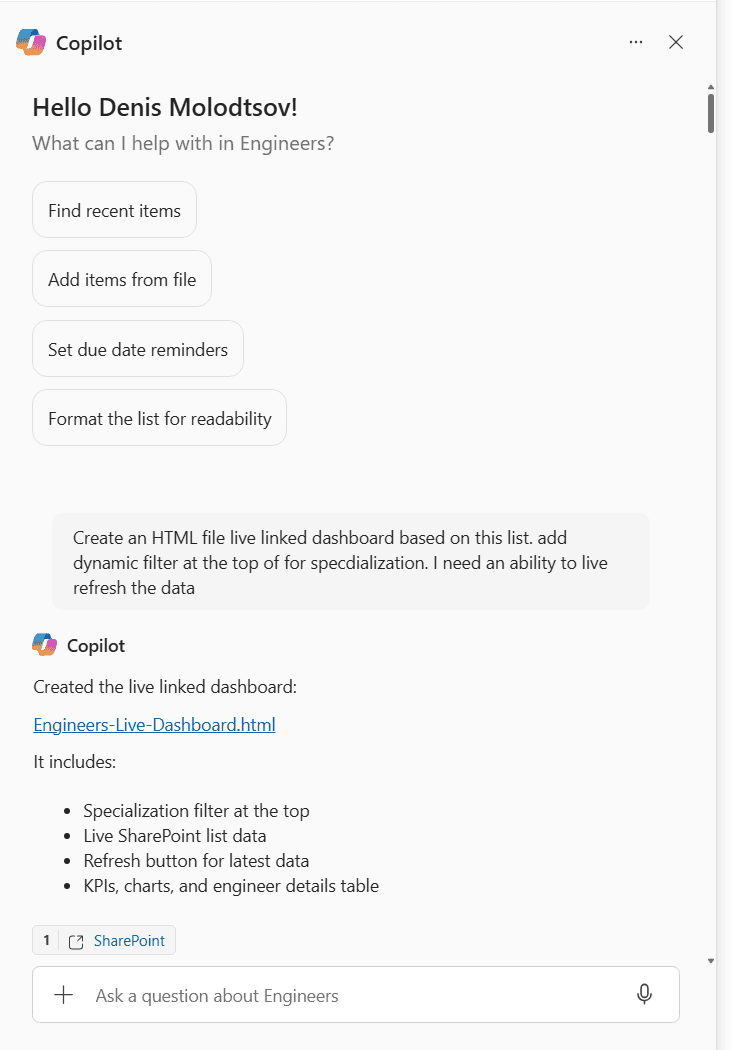
The prompt I used, and what came back:
Create an HTML file live linked dashboard based on this list. add dynamic filter at the top of for specialization. I need an ability to live refresh the data
Copilot creating a live-linked HTML file from the Engineers list
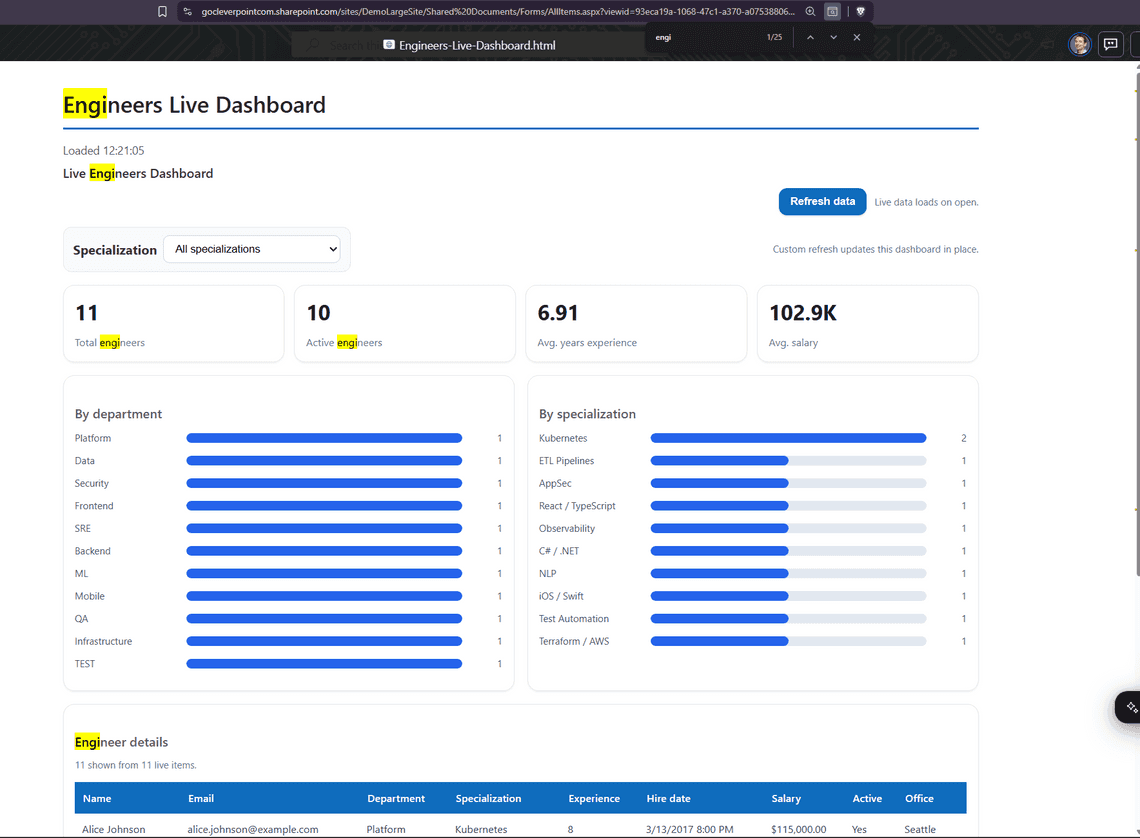
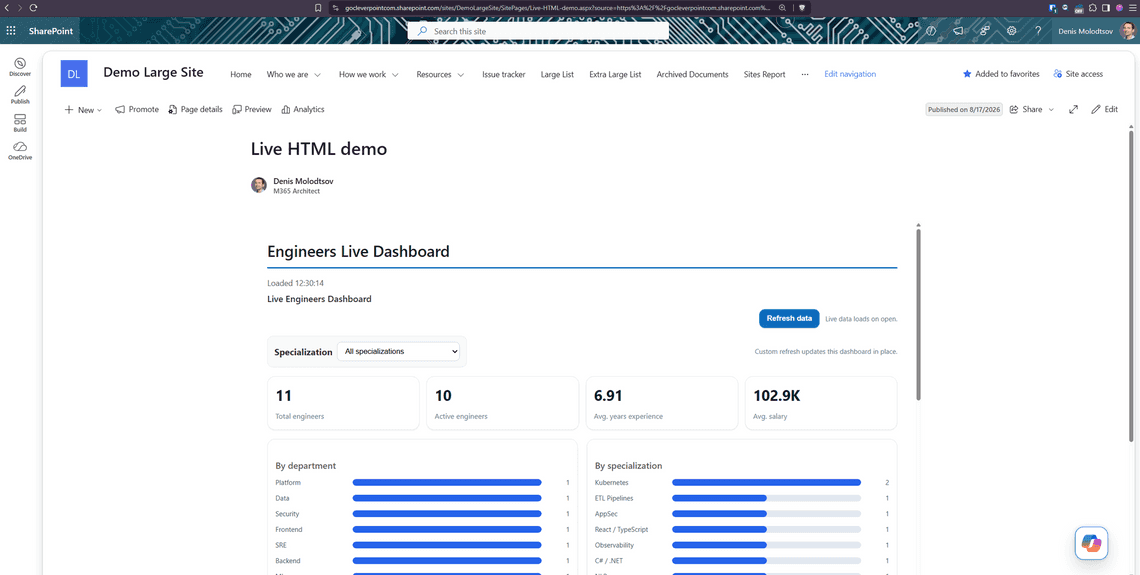
Copilot produced Engineers-Live-Dashboard.html, and the HTML file opens like this when I click on it:
The generated HTML file rendering with live list data
None of this architecture is documented on any official Microsoft site, so I spent some time inspecting the feature with browser developer tools.
When an HTML file is opened from a library, the SharePoint page around it does all the work. It reads the file, sees which lists the file has asked for, and fetches the rows itself using a SharePoint API called RenderListDataAsStream, pulling up to 5,000 rows per call with a total of 100,000 rows per source.
The SharePoint page then pushes those rows down into the iframe, as a variable sitting in memory, and the HTML file reads its data from that variable.
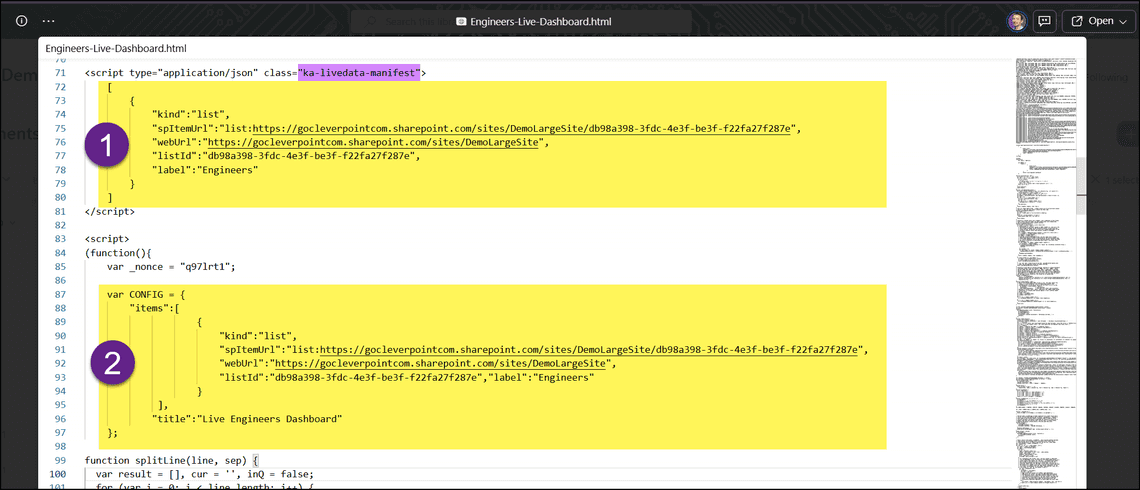
The HTML file never performs the fetch itself. It has no way to pull data in or send data out. The only thing the HTML file contributes is a config block near the top, declaring which sources it wants:
That config block is an array, so a single HTML file can pull from several different data sources at once. Multiple lists, or a mix of lists and files, combined into one view. SharePoint fetches every source before the HTML file renders, and each one arrives in its own slot in the same variable.
Copilot writes this block for you when it generates the file, and rewrites it if you ask for a different source later. Every address is fixed text, decided at that moment. SharePoint reads it before the HTML file is rendered.
Searching, filtering and sorting inside an HTML file all run in memory, against the rows that were already pulled before it appeared on screen. Nothing goes back to SharePoint to narrow a result set. When the data does need refreshing, the entire page holding the HTML file reloads from the beginning.
SharePoint does not run HTML files as traditional SharePoint ASPX pages. It runs them inside a sandboxed iframe, and that iframe is far more restrictive than anything a web developer or a SharePoint developer would expect. Most of what you take for granted on a normal web page, and everything you are used to on a classic ASPX page, is unavailable inside it.
The JavaScript inside the HTML file has no access to anything. It does not know who the current user is. It has no page context, no access to the Graph API or REST API, no browser storage, and no way to reach the SharePoint page around it. The single variable holding the pre-fetched data is all it gets.
SharePoint attaches a Content Security Policy to the iframe. That is a standard browser mechanism for declaring what a page is allowed to load and connect to. The one applied here reads, in part:
html
1
2
3
4
5
6
7
8
9
10
11
default-src 'none';
script-src 'unsafe-inline' 'unsafe-eval';
style-src 'unsafe-inline';
img-src data: blob:;
font-src data: blob:;
frame-src 'none';
connect-src 'none';
worker-src 'none';
object-src 'none';
base-uri 'none';
form-action 'none';
In plain terms, the iframe is a sealed room. The data is carried in before the door is locked, up to 100,000 items per source, and after that nothing else can be brought in or fetched.
The code inside can rearrange the furniture. It can also call out through an intercom, but only with a handful of fixed phrases SharePoint is listening for: “refresh the page”, “someone clicked a link”, “my JavaScript threw an error”. Nothing else can be said, and no new phrase can be invented.
The sandboxed frame with its injected security policy and the data written in alongside it
Two of those policies cause most of the “pain” for anyone used to building things in HTML and JavaScript:
connect-src 'none' stops the code making any request at all.
frame-src 'none' stops it embedding another page, so a Power BI tile, a Forms survey or a video will not work inside an HTML file.
If the HTML file has no network access, how does it get data?
The SharePoint page and the iframe inside it are kept completely separate, and only two things ever pass between them: the initial data going in, and a few small messages coming back out, like “please refresh the whole page” or “I got a JavaScript error”.
SharePoint pulls data from the supported sources, then pushes it into the sandboxed iframe holding the HTML file
The iframe gets no context of any kind. It has no idea who the current user is, which site it is on, or which library the HTML file came from. It receives nothing except the data itself, handed over as one large variable in memory.
The data handover happens exactly once, as the HTML file renders. By the time any scripts inside the HTML file (iframe) run, the rows are already sitting in that variable and there is no mechanism to ask for more data. Getting fresher data means reloading the whole SharePoint page. This is why I can’t call these HTML files “live dashboards”.
Going the other way, the HTML file can send a few fixed messages from the iframe. The list is short and closed:
Message
Notes
ka-html-viewer-ready
Tells the SharePoint page the HTML file has finished loading and rendering.
ka-html-viewer-refresh
Reloads the HTML file and re-runs the whole data fetch.
ka-html-viewer-link-click
Opens the link in a new browser tab.
ka-html-viewer-anchor-change
Sent when someone clicks an anchor link. The scroll has already happened inside the HTML file, so this is presumably so the SharePoint page can keep its own URL in step.
ka-html-viewer-js-error
Produces the red error banner.
ka-html-viewer-anchor
The only message that travels the other way. Tells the HTML page to scroll to an anchor.
These messages are requests, not commands. The parent SharePoint page decides what to do with each one. For example, clicking a link inside the HTML page asks it to open a URL, but it always opens in a new tab. Refresh asks it to fetch the data again, and it reloads the whole SharePoint page.
One of them is genuinely useful. SharePoint exposes a refresh() function to the scripts inside the file, so an HTML file can refresh itself on a timer:
js
1
setInterval(refresh,5*60*1000);// re-fetch every five minutes
SharePoint lists are not the only thing that can be used as a data source. SharePoint HTML pages support these:
format
Source
rows
SharePoint list
xlsx-sheets
Excel workbook, including multi-sheet
csv
CSV file
text
text file
All of it is fetched by the parent SharePoint page, outside the iframe, before the HTML file gets to render.
Values arrive already formatted for display rather than raw, so a currency column turns up as text like "$115,000.00" rather than a number.
The RenderListDataAsStream call made by the SharePoint page
The parent SharePoint page also pulls far more than a typical HTML file needs. It takes every column the list has, including hidden and system columns that are rarely used by anyone, so an HTML file built around fifteen columns receives closer to eighty-five. There is no way to narrow it.
On a small list none of that matters. On a list near the 100,000 item ceiling it does: all those extra columns are held in browser memory, and a single load can easily approach a gigabyte.
The request payload showing the view XML used to locate the HTML file
Everything the parent SharePoint page fetched is pushed into the iframe and lands in a single variable, window.__LD_RESULTS__, keyed by data source:
SharePoint does not open the HTML file the way a browser opens a typical web page. In terms of the user experience, it is closer to opening a PDF file, odd as that sounds.
Copilot writes its HTML files knowing the architecture of the HTML viewer, the config syntax requirements and the messages protocol. If you attempt to use a random hand-written HTML file with, it will only work as a static file. But if your HTML file requires any external data from SharePoint lists or Excel files, it will not work without the correctly specified config block at the top and the right messages protocol inside it.
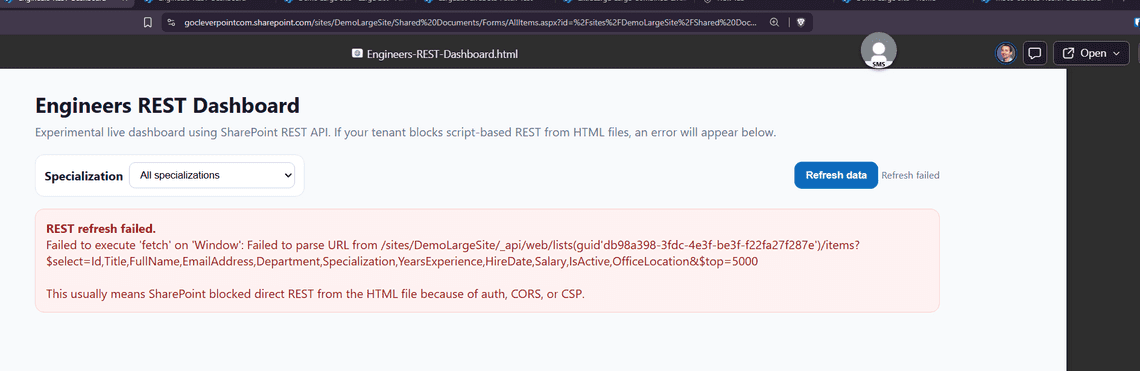
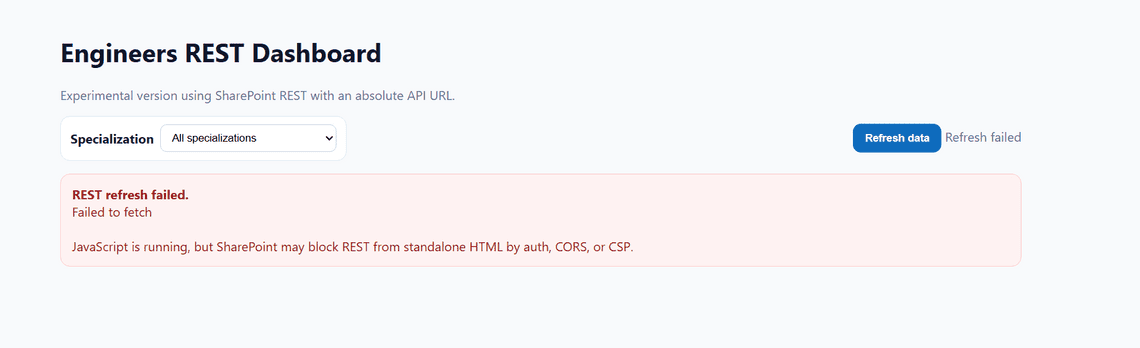
The SharePoint REST API cannot be called from inside the HTML file. Not with a relative URL, not with an absolute one, not from any script in the file.
I asked Copilot to try it both ways. A relative URL fails to resolve at all:
fetch with a relative URL fails to resolve
An absolute one is blocked outright:
fetch with an absolute URL is blocked outright
Microsoft Graph fails the same way. Copilot will happily offer to build you an HTML file that uses it, and it just will not work.
Apart from the data sources listed in the config block, nothing can be referenced from outside the file. No JavaScript libraries, no frameworks, no CDNs, no stylesheets, no fonts, no images. Whatever the file needs has to be sitting inside the HTML itself.
That applies even to files in the same library, on the same site, in the same tenant.
Resource
Does not work
Works
Stylesheets
<link rel="stylesheet" href="...">
<style> blocks and style= attributes
Scripts
<script src="...">
inline <script> blocks
Images
<img src="https://...">, and any relative path
data: URIs, inline <svg>, <canvas>
Fonts
Google Fonts, or your brand’s webfont
@font-face with a data: source
Nested frames
Power BI tiles, Forms, YouTube, Stream
nothing at all, frame-src 'none'
Workers
new Worker('worker.js')
nothing at all, worker-src 'none'
Any request
fetch, XHR, WebSocket, sendBeacon
nothing at all, connect-src 'none'
I asked Copilot to add an external stylesheet and an external script to an HTML file. Both were blocked:
An external stylesheet blocked by the security policy
An external script blocked by the security policy
Images are worth calling out, because the restriction is easy to miss. A logo in Site Assets, a photo in the same library as the HTML file, a profile picture, a list attachment: none of them load. Every image has to be embedded into the file itself as a base64 string, which inflates it and means a few screenshots produce a multi-megabyte HTML file.
SharePoint swaps all images with a small grey rectangle, and that is all you get.
JavaScript libraries are technically possible. Paste the entire library source code into the HTML file and it will run. That is not conventional, not convenient, and not something anyone is likely to do for a library the size of Chart.js. Copilot will not do it for you either.
Which is why every chart Copilot builds is made of styled div elements rather than a charting library. That is not a design preference. It is the only option left.
This is the limitation that rules out most of the cases where people want to use HTML files as custom pages.
Every link in the HTML file is intercepted. SharePoint cancels the click and opens the URL itself, always in a new browser tab. The target attribute is ignored completely, so there is no way to ask for anything else.
I tested four variants pointing at the same site:
Four link variants with different target values, all behaving identically
target="_self", target="_top", target="_blank" and no target at all. Every one opened a new tab. rel="noopener noreferrer" makes no difference either, since SharePoint opens the tab, not the HTML file.
The only navigation that stays in place is a #fragment anchor jumping within the same file.
In practice this rules out most of what people would want to build.
A custom intranet built from HTML files is out, since moving between them spawns a new tab every time. So is a landing page with tiles that lead somewhere, a navigation menu, breadcrumbs, or a simple “back to the list” link under a report. A department home page with links to policies, forms and team sites would open a new tab on every single click.
Custom web parts and apps are out for the same reasons. No form that submits, no button that updates a list item, no approval screen, no wizard that walks someone through several steps and saves the result.
What does work is a single self-contained screen, read-only, that shows data and lets someone search, filter and sort what is already in front of them. Anything past that, where the reader clicks through to somewhere else or changes something, is off the table.
Editing is awkward too. There is no WYSIWYG editor for these HTML files in SharePoint, so changing anything by hand means downloading the HTML file, editing it locally or through OneDrive, and uploading it back. You can also edit the HTML markup direct from the SharePoint library (see the screenshots further down). In my opinion, asking Copilot is the only sensible route, granted you have the license.
Because external stylesheets and fonts cannot be loaded, an HTML file cannot pick up your site theme, your tenant brand, or a web font. What Copilot does instead is hardcode values that look like Fluent:
Retheme your site and these will not follow. Switch to dark mode and they stay light.
The flip side is that an HTML file looks the same everywhere. Nothing is inherited from the site around it, so it renders identically on any site, in any tenant, for any user.
Copilot can generate a plain static HTML file, with the rows written in at generation time, or a “live” one that re-fetches on every render. Everything below concerns the live mode, which is the one that makes this feature interesting and the only one I tested at scale.
I tested it against progressively larger lists.
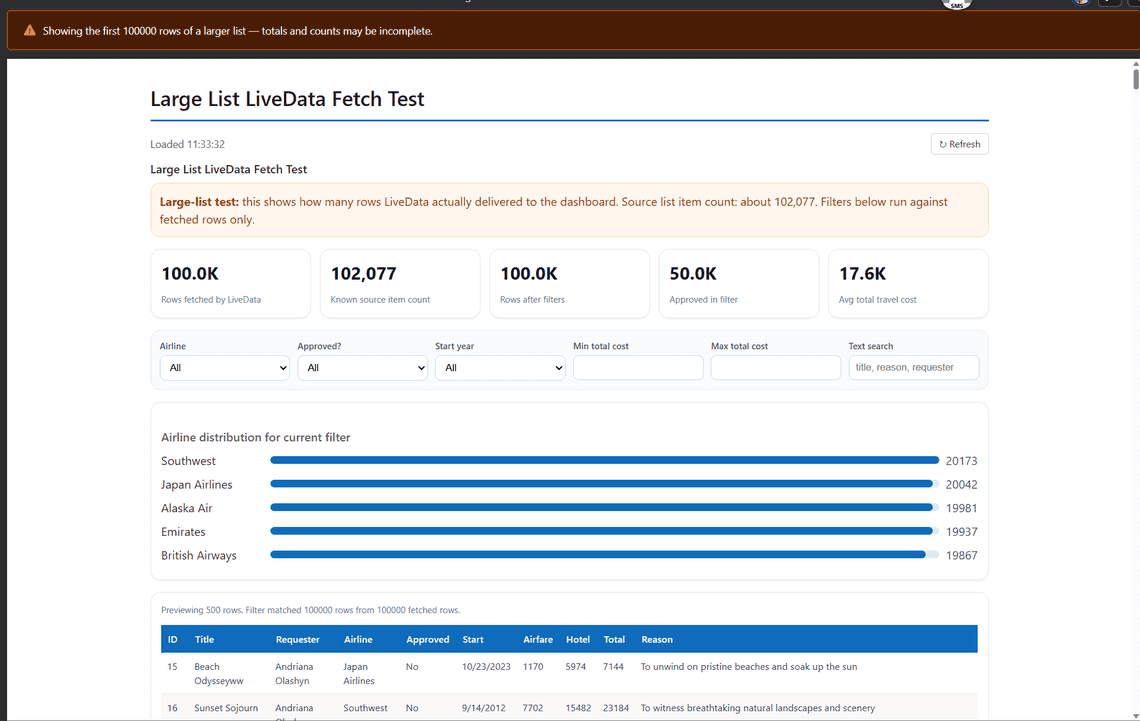
A list of 102,077 items returned exactly 100,000 rows:
A 102,077 item list returns 100,000 rows
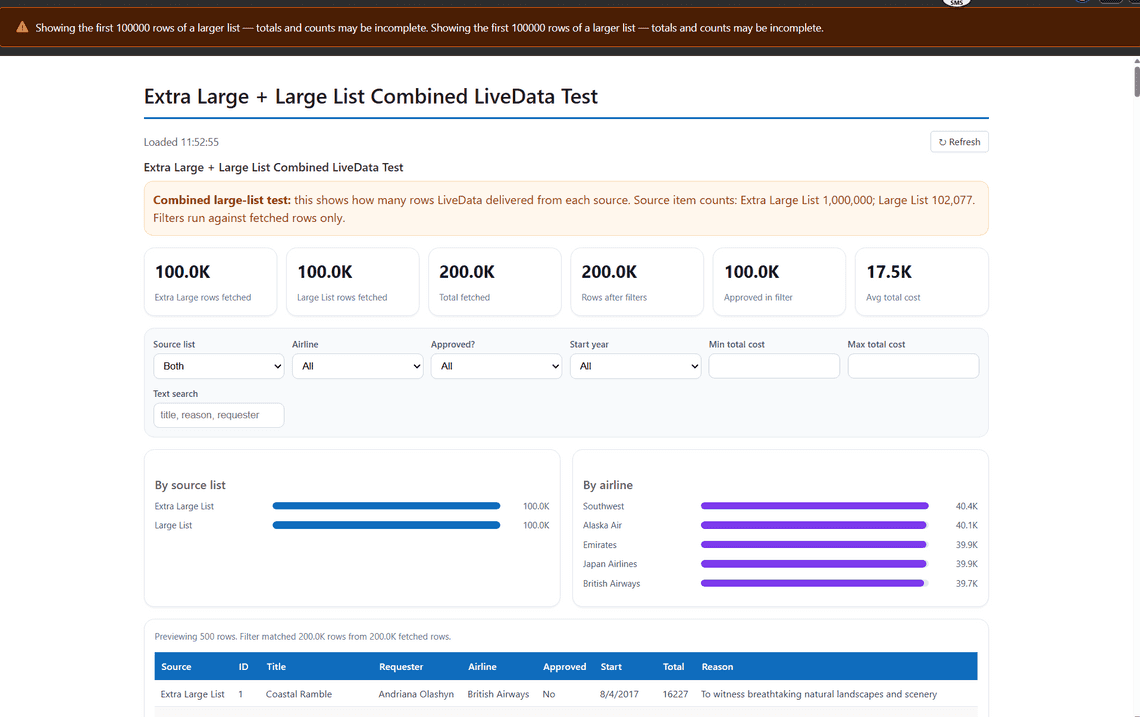
A list of 1,000,000 items also returned exactly 100,000. Combining both lists in one HTML file returned 100,000 from each, for 200,000 total, so the cap is per source, not per HTML page:
Two large lists combined, 100,000 rows fetched from each
Rows arrive in batches of 5,000, which puts the ceiling at twenty round trips per source. Refreshing returns the same rows every time, in the same order. There is no offset, no paging token you can advance, and no way to reach item 100,001.
Totals and averages are calculated from whatever was fetched, so on a list past the cap they can be wrong. Lists that large are rare, so this will not affect most people.
At 200,000 rows (across two lists) of this formatted, metadata-heavy output the transfer can exceed two gigabytes.
One myth to kill while we are here. The 5,000 item list view threshold does not apply. Paged RenderListDataAsStream walks straight past it until 100,000 items are fetched.
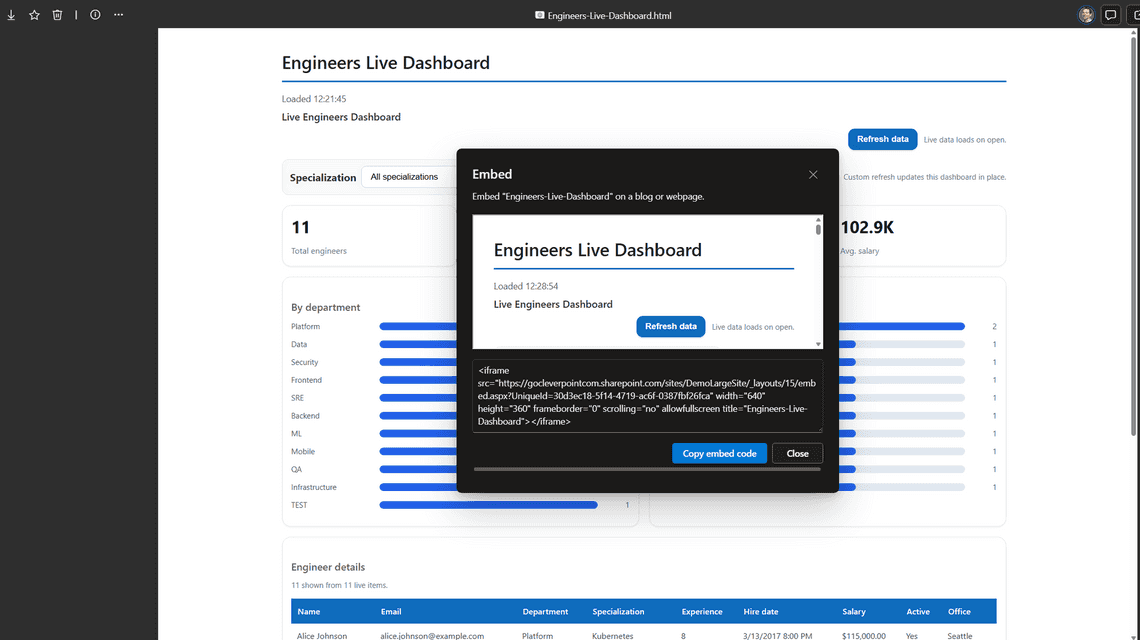
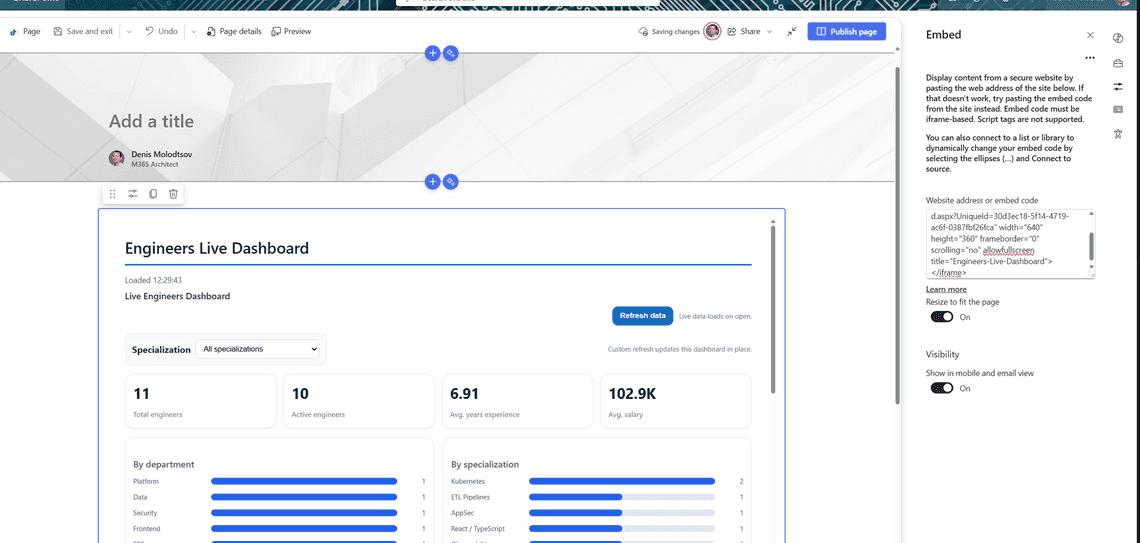
The official roadmap describes rendering HTML from the pages library, which has not shipped yet. Until it does, the Embed web part is how you get an HTML file onto a normal SharePoint page.
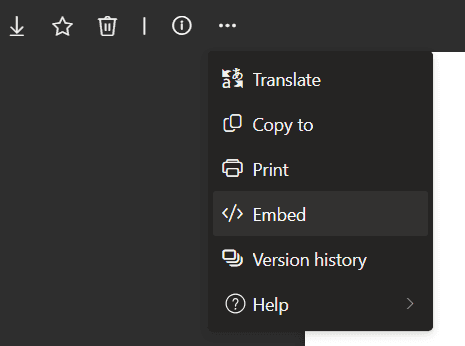
When you open the HTML file, the preview toolbar has an Embed option:
The site I tested on has custom scripting denied (NoScriptEnabled: true). The HTML files run fine.
The practical upside is zero deployment. No app catalog, no SPFx package, no tenant admin, no approval. That is not a huge advantage over SPFx, though, since modern SPFx web parts can also run on NoScript sites. Only the classic script editor is blocked.
Way back, people, including myself, used to rename an .html file to .aspx, upload it to a document library or site pages and get a working page out of it. That is not what is happening here, and that trick no longer works anyway. It also required custom scripting enabled, and now per-site custom scripts revert within 24 hours when a timer job re-applies the mandatory tenant policy.
The roadmap wording invites the comparison, but an HTML page is not really a page (at least not yet). It is just an HTML file that displays inside a library. There are no web parts, no audience targeting, no approval or scheduling, no comments.
Search is worth thinking about too. The markup of the HTML file should be indexed like any other file, but the data never will be, because it is pushed into the page at render time and only exists in the browser. SharePoint search sees an empty HTML shell. Nobody will ever find one of these files by searching for something in the data it shows.
Authoring HTML needs a Microsoft 365 Copilot license. Consumption doesn’t.
I tested with a user who has no Copilot license. The HTML file rendered, the data populated, and the Refresh button returned fresh rows. Copilot touches the file once, when it is created, and never again, unless you ask it to make more changes. Both the render and refresh features are stock SharePoint.
So a handful of Copilot licenses can serve an entire organization of HTML readers.
You can also skip Copilot and upload an HTML file yourself, which needs no license at all. That works fine for basic static HTML files.
Data is another matter. You would need the config block to be exactly right.You can ask an AI to generate it, but no AI outside Microsoft Copilot currently knows this format, because it is undocumented. So for a “live dashboard” HTML file today, Copilot is the only practical option.
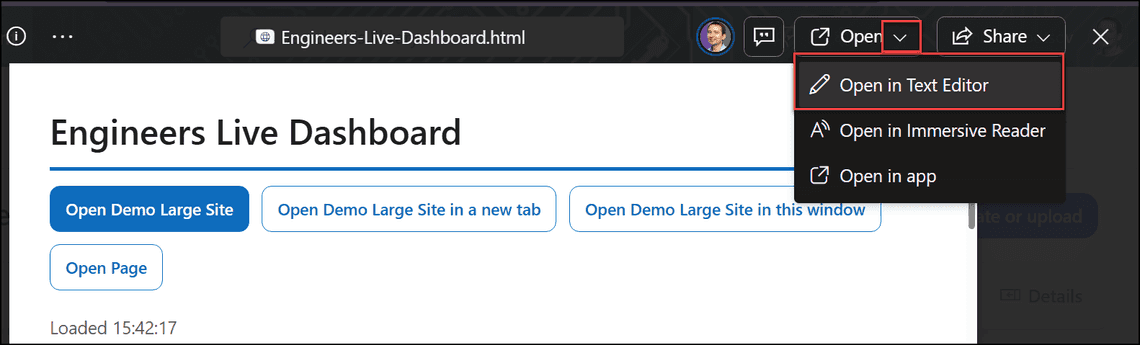
💡Tip: You can view and even edit the HTML file directly from SharePoint if you click Open > Open in Text Editor.
Open HTML file in Text Editor
Config sections of a typical HTML file:
HTML data source config
Nothing lives in SharePoint metadata or the property bag. It is all in the HTML file.
That means a copied HTML file still points at the site it came from. I copied one to another site collection and it opened, still reading the original list. Migration tools will not fix it either, because this is not a link or an image they can recognize.
You can edit the config section inside the HTML file yourself.
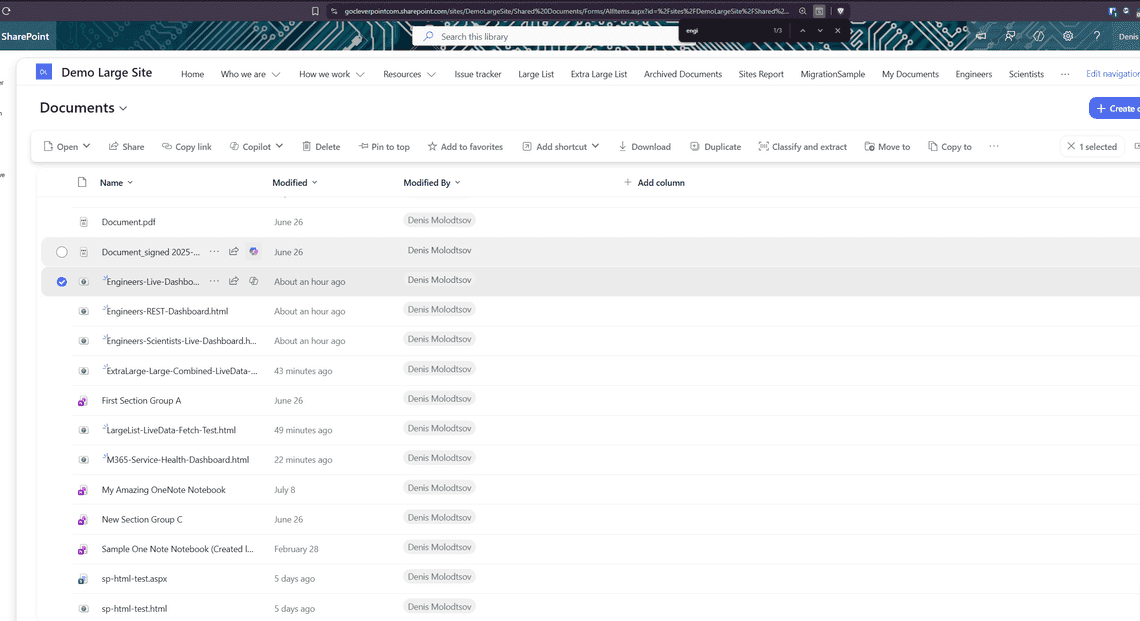
Depending on the prompt, tenant and other conditions, generated HTML files turn up in Documents, in Site Assets, or eventually in Site Pages. All of mine landed in the site’s default document library:
There is really one primary use case for these HTML pages, and it is the one Microsoft built this for: ask Copilot to create a report, a dashboard, or a static HTML file, look at it, and ask Copilot again when you want it changed. That loop works well, and it is the whole point of the feature.
The reason it exists at all is that Copilot needs a format it can write in one pass. In theory Markdown could be a good option, but it’s lacking JavaScript and styling support. An HTML file is perfect, so Copilot can produce the whole thing and rewrite it on request. A PDF, or a SharePoint page made of web parts, it cannot easily produce.
Beyond that loop, use one when all of these are true:
it only reads data
it does not need working links
the source list is well under 100,000 rows
You don’t need to display pictures
You don’t need to write back to SharePoint
and nobody needs to print it
Everything else people are hoping to do with this, custom home pages, navigation, small apps, runs into the sandbox almost immediately. Someone may find a clever use cases, but the iframe is locked down tightly enough that I would not plan around it.
Writing data back, navigating between pages, printing, matching your brand, or working with more than 100,000 rows all need SPFx, Power Apps or Power BI.
If you attempt to print, you get one page, captured at whatever scroll position the HTML file happened to be at, scrollbars included. Same result from the file preview or from a published page.
Printing a published page produces one page cut off partway down
The browser prints what is visible, and nothing you write inside the HTML file changes that. If the output needs to become a PDF, this is the wrong surface.
SharePoint has never rendered HTML files. How does this work now?
It still does not, in the old sense. SharePoint is not running the HTML file as a traditional ASPX page, or the way a web server would serve an HTML file. It puts that file inside a heavily restricted iframe and hands it a JavaScript engine and nothing else.
Our tenant blocks custom scripts, and HTML pages run JavaScript. Why is this not blocked?
Because the sandboxed HTML viewer places the HTML file inside an iframe, it makes it harmless. See the section on custom scripting above.
Can I open the raw HTML directly instead of the preview?
No. Every route lands in the sandboxed viewer, which is an iframe. There is no way to open the HTML file full screen on its own. You can create a modern SharePoint page with the embed webpart though.
Can I have a truly live HTML dashboard?
No. It is a snapshot taken at render time. Refresh reloads the whole iframe, which makes SharePoint fetch everything again and write the new rows back in. There is no live connection, no push, and no incremental update.
Can I use Chart.js? or other charting libraries?
No, unless you paste the entire library into the HTML file. Otherwise the charts have to be hand-built, which is what Copilot does for you anyways.
Does viewing one cost anything?
No AI model runs at view time, so there is no inference cost and no Copilot license needed. The only time Copilot is involved is when it generates the HTML file, or when you ask it to change the HTML file.
The clearest way to think about an HTML page is as another file format SharePoint can display on screen, alongside PDF, Word and Excel. It shows semi-static information and it is meant to be read. It is not a scripting feature and it is not developer-friendly. What it really does is give Copilot a convenient format it can write in one pass, which pages built from web parts are not. This feature is not a replacement for SPFx, Power Apps or Power BI. It is a new file format that Copilot can write to, and that is the only reason it exists.
There is rudimentary support for pulling in data from lists and files, but with heavy limitations and no ability to write, edit, update or delete anything. Read-only, in every sense.
Nothing is cached, either. Every refresh pulls everything again from scratch, so changing a single row still means waiting for the whole data set to come down before you see it. For anything of real size, Power BI is still the king.
Inside the sandboxed iframe the HTML is heavily restricted. No HTTP requests, no external stylesheets, no external scripts, no images that are not embedded in the file, no fonts, no nested frames, and every link forced into a new tab. Microsoft built it locked from the start, and that is the only reason it can run on sites where custom scripting is denied.
The October 2026 pages library release will almost certainly change some of this. I do not know which parts yet, so I will run the tests again and update this article once there is something concrete to report.