
HomeAboutAll PostsVideosSearchRSS

Microsoft Teams and blocked accounts, a common trap

By Denis Molodtsov
Published in Teams
November 10, 2026
2 min read
Microsoft Teams and blocked accounts, a common trap
Table of contents

Microsoft Teams and blocked accounts: a common trap

This is the second post in a series on Microsoft Teams channel traps. The first one, Vanishing Private Channels and the Dangers of Cleaning Team Permissions, shows how private channels can be deleted when their last owner is removed.

Blocking sign-in for a user in Entra ID looks like a safe, reversible step. You block the account, and later you unblock it. In Microsoft Teams, it is not fully reversible.

The short version: the user loses their teams and channels, and gets back only the teams.
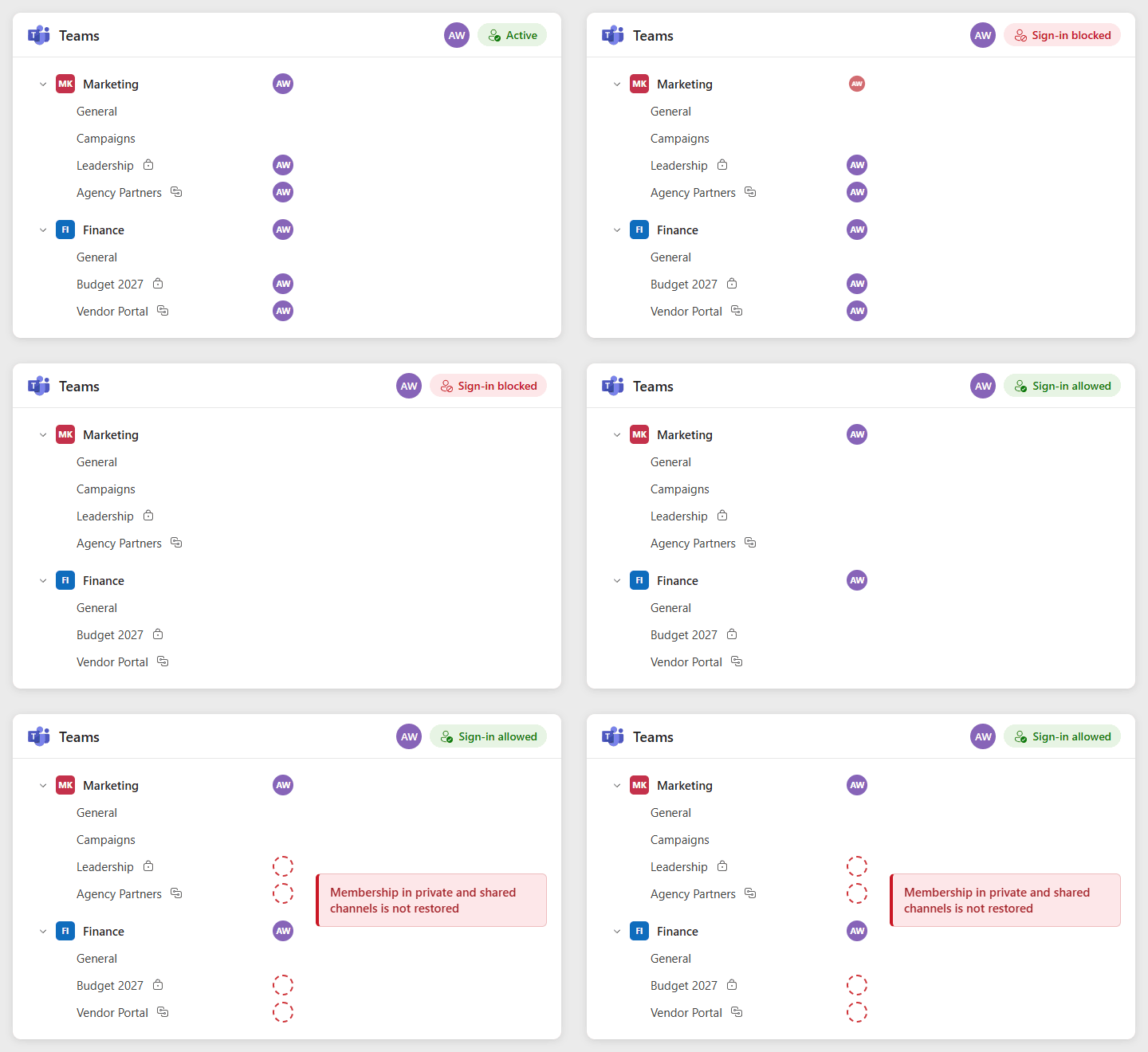
When sign-in is blocked, the user's membership disappears from the teams and from the private and shared channels. After the block is lifted, team membership comes back, but private and shared channel membership does not

What happens when an account is blocked

When an account is blocked, Teams removes it from the teams it belongs to. Removing a user from a team also removes them from the private channels in that team. Org-wide teams drop the account too, because blocked accounts lose automatic memberships.

The removal does not happen at the moment of the block. It can happen within hours, or it can take much longer.

What happens when the account is unblocked

When the account is unblocked, Teams adds it back to its standard teams, after a delay. Standard channels come back with the team. These do not come back on their own:

  • Private channel memberships
  • Org-wide team memberships
  • Tags that were assigned to the user

What I saw

I first ran into this in January 2026. Today I saw it again: a user’s account was blocked for only 1 to 2 hours. In that short time, the user was removed from all of their teams and channels. After the account was unblocked, the user was added back to the teams, but not to the channels. That was nearly 20 private and shared channels, and each one had to be added back. In my experience, the teams themselves come back within 24 to 48 hours.

How to avoid the trap

  • Before you block an account that will be unblocked later, record the user’s private and shared channel memberships, so you know what to add back.
  • After you unblock it, give Teams time to restore the team memberships, then check the channels. Channel owners can add the user back, or an admin can do it in the Teams admin center or with PowerShell.
  • If the blocked user was the last owner and member of a private channel, check that the channel still exists. Private channels with no owners or members can be deleted automatically, as I described in Vanishing Private Channels and the Dangers of Cleaning Team Permissions.

Take a daily snapshot of channel memberships

You do not always know in advance that an account will be blocked. After I first saw this in January, I set up a script that takes a snapshot of all private and shared channel memberships every day. When a user loses their channels, the last snapshot shows exactly what to add back.

Here is a simple sample with the Microsoft Teams PowerShell module:

powershell
Install-Module -Name MicrosoftTeams -Scope CurrentUser
Connect-MicrosoftTeams
$rows = foreach ($team in Get-Team) {
$channels = Get-TeamChannel -GroupId $team.GroupId | Where-Object MembershipType -ne 'Standard'
foreach ($channel in $channels) {
foreach ($user in Get-TeamChannelUser -GroupId $team.GroupId -DisplayName $channel.DisplayName) {
[PSCustomObject]@{
GroupId = $team.GroupId
Team = $team.DisplayName
Channel = $channel.DisplayName
Type = $channel.MembershipType
User = $user.User
Role = $user.Role
}
}
}
}
$rows | Export-Csv "ChannelMemberships-$(Get-Date -Format yyyy-MM-dd).csv" -NoTypeInformation -Encoding UTF8

Standard channels are skipped, because their members are the members of the team. To add a user back to a channel from the snapshot:

powershell
Add-TeamChannelUser -GroupId $GroupId -DisplayName "Channel name" -User "user@contoso.com"
# For a channel owner, run it again with -Role Owner
Add-TeamChannelUser -GroupId $GroupId -DisplayName "Channel name" -User "user@contoso.com" -Role Owner

To run the snapshot every day as a scheduled task, connect with an app registration and a certificate instead of signing in.

Learn more

Tony Redmond’s article Teams Processing Causes Problems for Disabled Azure AD User Accounts on Practical 365 goes much deeper. It shows the timeline from the audit log, the audit events to search for, and what was and was not restored. His article covers private channels. In my case, shared channels were not restored either.

Found this useful? Follow me on LinkedIn to see my new posts.
Follow on LinkedIn

Tags

TeamsMicrosoft 365Entra ID

Share

Previous Article
How to Manage Copilot Agents Without Being a Global Admin
Denis Molodtsov

Denis Molodtsov

Microsoft 365 Architect

Microsoft Most Valuable Professional (MVP)

Related Posts

Vanishing Private Channels and the Dangers of Cleaning Team Permissions
November 09, 2025
4 min

Quick Links

AboutAll PostsRSS

Social Media